
EchoLink is one of those topics that is sure to start an argument whenever someone brings it up at a ham gathering. I started one myself recently, when I proposed that we allow EchoLink contacts for our club’s Worked All Washtenaw award. Some guys maintained that EchoLink contacts shouldn’t be allowed because it allows for computer to computer communication, and in that mode, EchoLink contacts are not “radio” contacts. While I see their point, I felt that they should be allowed because this is just a fun award.
Now, these guys have even more “virtual ham radio” operations to complain about: QSONet and HamSphere. Both of these services claim to simulate the ham radio experience with a computer program.
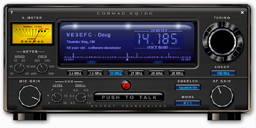 QSONet, which bills itself as “virtual ionosphere for amateur radio,” has been around for at least a year. To get on QSONet, you download software that simulates an HF transceiver. (The software only runs on computers running Windows operating systems.)
Once you start the program, you select the mode that you want to operate (including CW!) and the “frequency” on which you want to operate. Then, you log into the QSONet network. The company claims that, “it works with dialup, DSL and cable internet connections. There is no need to configure router ports. The network consists of an array of internet servers which provide streaming voip audio between stations. After installing transceiver software, QsoNet stations are connected to a central server by a single, outbound TCP connection.”
To use QSONet, you must be a licensed radio amateur, even though, as they say on their website, “There is no RF. Everything is done over the internet.” It also costs to use QSONet. After a 90-day free trial period, you must pay a $32 subscription fee.
A new service that I just heard about is HamSphere. Created by Kelly Lindman, the founder of DXTuners, this service seems to be a bit more sophisticated than QSONet.
For example, the HamSphere websites notes that “skip, fading, QRM, QRN, multipath phase effects, etc. are all factors and rules in this simulation. The system follows the ionospheric laws of radio wave deflection.” You can also choose different power levels and antenna types. The user interface isn’t as slick as the QSONet interface (see below), but perhaps that’s a good thing.
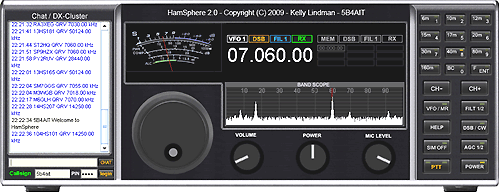
One big difference between HamSphere and QSONet is that anyone can use HamSphere, licensed or not. Another difference is that the software will run on Macs and Linux boxes as well as Windows computers. And, finally, there’s no free trial period, after which you have to pay. Instead, HamSphere is allowing users to run the basic version for free and trying to make money by selling optional features.
Like EchoLink, I think these virtual ham radio services might be appealing to hams who live in antenna-restricted communities or others who for whatever reason are not able to set up their own station. BUT, they are certainly not a substitute for the real thing. I just can’t see how making contacts with QSONet or HamSphere would be as satisfying as making on-the-air contacts.
At first these struck me as really bizarre, but then it occurred to me that they’re really in the same category as other simulation games, like flight simulators or driving games. I suppose in that context they’re not all that strange.
Simulation! You said it right there.
MS Flight Simulator is NOT “really flying”.
Echolink, Hamsphere and Qsonet is NOT “really radio”.
Guitar hero on my sons Xbox is NOT “really playing guitar”.
Where’s the PLANE?
Where’s the GUITAR?
Where’s the RADIO?
And the famous “Where’s the BEEF?
73!
Jim
I think Echolink is in a different category than Hamsphere and Qsonet, though. Echolink is just a fancy form of reverse autopatch, something that’s been going on for a long time. It’s a tool for talking to people on repeaters you wouldn’t otherwise be able to reach.
On the other hand, Hamsphere and Qsonet, by design, don’t involve any radios at all. To me that makes them more like ham radio inspired games than actual communication tools.
I’m planning on trying out the Hamsphere one, as it looks pretty neat. I’d agree…it’s like a Ham Radio simulator software…just like Flight Simulator is for flying.
73,
Justin KB3JUV
Hamsphere is a great bit of software . Very realistic propagation and QRM/QRN.
What happened to RADIO? this is just a large scale VOIP conference call.
I would say you should convince the people that echolink should be allowed for those awards as long as a radio link is involved
73
Just found hamsphere, it’s great for those of us that have antenna restrictions and are suffering these times of little sunspot activity.
I’ve tried qsone and it worked very well, but my key has been expired :)
Can anyone tell me where you can get these “extra features” for Hamsphere IE antennas, maybe a key for cw? or can someone tell me ow to use these features
Hamsphere sounds great. I’ll be trying this out soon.
HamSphere is a terrific program. No one is claiming that it is actually Ham Radio. I think the program only inspires folks who want to give virtual ham radio a try while studying for their ticket. My hat goes off to Kelly Lindman, the developer.
If you’d like more info on HamSphere visit the web site, http://www.hamsphere.com or go to our new un-official HamSphere Forum at:
http://www.hamsphere.lefora.com
73 to all
Jerry
Hamsphere is terrible. There are a bunch of inexperienced CB’ers hanging around on there. No true ham radio operator would enjoy it. Stick with real rf or Echolink and CQ100.
True Ham Radio Operators? Would you be kind enough to define that for me Mark? A true Ham Radio operator is willing to help other folks interested in the hobby. I spend at least 6 to 8 hours a week doing just that. I help young folks with correct operating procedures and basically how to conduct themselves on the air. I had one fellow who refused to use Hamsphere because he had to share with non licensed operators! How selfish.
I am so proud of the way some of those “CB’ers” act and show their interest to learn. It is by far the best learning tool I have seen.
Mark, “True Hams help, period. Try it sometime and get off your high horse.
One last suggestion. Put a mirror on the floor wherever you are, that way when you are looking down on people, you’ll see how ridiculous you look.
Jerry Colton – N1TKO
“A True Ham”
I help people all the time. I’ve been to the hamsphere website and see it is just a bunch of fakes using fake radios doing fake contests exchanging fake QSL cards. I bet it is really hard to get a QSO from the UK or Australia on that crap! It is simply a glorified chatroom for CB’ers who are too lazy to get their license. I see you are on there a lot, N1TKO. You must be sore because of your involvement with it?
some people don’t have the time to learn radio theory and or are not good at math. so be nice. you know it could be worse, we could crash your party directly by becoming pirate radio operators…
I’m dsyelxia and found it hard to learn and studying for my exam. but hamsphere was a stepping stone it help me gain condifence in talking on in air and the guys on there where great help. I have now pass my ham exam and now a license user.
I would recommend these virtual radios any day to gain a step into the world of amatuer radio as a true ham wants to learn and help others no matter if they cbers swl etc. We all started off at the bottom.
OK, guys. Let’s not get into a flame war here. I don’t want to start having to delete comments. Thanks!
I am a true ham radio operator. For a lonb time now I have been trying the real thing without much success. Living here in Las Vegas and only restricted to low power, it is real hard to get a signal out of the valley being surrounded by mountains everywhere. Plus the fact that in apartment living really restricts you for putting up a fairly decent antenna. When I first found QSO 100 and hamsphere, I knew it was simulatred but once you try it, it feels real. Yes, I can easily talk to many hams all over the world with ease and having a contact is so enlightening. If you get rid of the idea that it is just a game, then maybe you can thank the people who started this and offer a means whereby you can communicate as a ham should. Just tuning around you hear from so many people who are older hams like myself and are given another chance to pursue their hobby from when radio was in it’s infancy. You get to keep a log and even have the ability to send a virtual QSL card. It’s like having a $3,000 console transciever facing you which you can still control.
Good for you Mel!! Life is too short and enjoy it whatever way you please. I’d still be on Hamsphere but they are too lax when it comes to registration. I believe, as I said before, it is a good learning tool where Hams can help those who want to become Hams, learn the ropes. But if you are going to run something like that, you must set a good example. Letting guys on using expired licenses or bogus calls is not setting a good example. Let the guy with the expired call use an “HS” call like all the other non hams. So I refuse to use it now.
I know its not real Ham radio, but heck, you Mel are a perfect example of a Ham who can’t use the real thing for one reason or another and if Hamsphere fills that void…. go for it Brother.
I can’t count the times I have been on there and heard ol’ timers talking and how happy they are to be back in touch with old Ham friends. Let “them” call it what they want…. if you like it, that’s all that counts.
73
Thanks Jerry and everyone else who have given ham radio a positive boost. The coolest thing about it, that is virtual ham radio is once you are on the air (so to speak) is that you forget the virtual part and look at it as the real thing. I know it is good to have the real gear set up to an antenna but I am certain everyone here, is very grateful to have such a program as this to enable us to simulate a real contact. I’ve tried it and really enjoyed it. Many of us “old timers” grew up with radio and soon will retire. Hopefully, we can establish a means to share this hobby with younger folks and help them. Since the FCC has changed so much over the years, it enables everyone to join in and not have to worry about all the restrictions about licensing requirements. The incentive is there. You can always rely on ham radio when it comes to emergencies and to be able to patch communications. I know, I did this in the past and it gave me a sense doing good will. I remember back in 1963 when I was in charge of a ham radio station when I was stationed in Arkansas and worked a real emergency that was going on in the Antartic. I was able to patch communication locally which enabled a rescue mission to the area where lives were lost and enable to save the injured. It was a real experience and afterward, I felt very good that I could do something such as this. There were other missions in patching in families with service personnel abroad. Anyway, these are just some of my events.
Mel
I have tryed and use both hamsphere and CQ-100 both programs in my option are a great asset
to our hobby Amateur radio I’m graatfull for both programs.The CQ-100 has the TV and lets
you send pictures I realy like thet and engoy the contacts without qsb and qrm with almost
studio quality audio.The hamsphere is more authentic seems to have qsb and some qrm
almost like having the rig on.Anyhow I have both ham radio station with amtor packtor packet
sstv and cw don’t need a paper and pin i learned how to hear whole words and relay enjoy it.
Also use echo link and eqso love it all keep it coming 73’s John
What bothers mi on CW Hamsphere is that you have to write the whole sentence and pres enter when youre done. Isnt anyway to send the characters in real time as you go on typing? or can you plug a key?
I’m glad that there are people who enjoy hamsphere. As for me, I enjoy radio because of the fact that you can communicate without a network, just radio to radio. I don’t even like using repeaters! Yes, radio is mainly a hobby for me, but I love the fact that it can be used when all else fails! Cellphones, internet etc. When the internet go’s down, so does hamsphere. Everything that keeps me interested in radio will also keep me FROM using hamsphere. Again, this is just my opinion, I would never want to stop people from doing things they enjoy.
with these “virtual ham radio sites” one doesn’t have to worry about competing with 1500 watt stations!! everybody is equal!! no “big guns” to command the frequencies,the “Little operator” gets to enjoy his hobby!!
Well, that’s one way to look at it, but I only run 100W here, and I enjoy the hobby quite a bit.
Dan,I’ve never run over 100 watts,now i run a Century 21 CW rig at abt.30 watts,a HW-8 at abt.3 watts max. and a MFJ9420 at approx.10 watts, and i too,enjoy the Hobby!!
I think it’s misleading to refer to it as Ham Radio. More correctly it should be called Citizen’s Band “X”, or CB-X because listening to it, you get a very distorted idea of what actual Ham Radio is like.
Your web page indicates that HAMSPHERE basic is still free to use. Are you sure about that? Their site seems to say that you have to pay now. What am I missing. If there is a basic version for free, then I want to try it. Otherwise I probably won’t bother.
Thanks – Any insights would be appreciated.
I just took a look at their website, and I’m not sure what they’re offering now. The pricing page does mention a free trial, but doesn’t say how long that trial lasts or what features you get with the free trial.
Been out of ham radio for 8 years, moved to rural Idaho and would like to get on Hamsphere. How easy is it, and what extra do I need beside my laptop?
Please send an easy to understand answer.
Joel Starr EX-N6IXZ
Been a Ham operator for a long time. about 21 years ago moved to a house where outdoor antenna’s are prohibited. So I pretty much sold everything and quit the hobby. Saw this Ham simulator on the net, and decided to give it a go. Used both radio’s mention here.
I can tell you one thing, it is better get back on and talk to people and yes a few Hams, than not at all. Is it not the reason we do any of this, to communicate and have a few good laughs once in awhile?
I got to the Advance ticket , made radio kits, keyer kits, etc and learned a lot about radio theory becoming a Ham operator which I enjoyed. However lets not put our noses up in the air at new ideas. To me this is just a new facet of the hobby, we have to learn there is more than one way to skin a rabbit. This is a different way for some to continue their communications when other avenues have shut down or are no longer convenient.
Lets go out and serve the world and encourage others to become Ham operators, after all many Ham operators came from the CB craze of the 1970″s and for most part it was a good thing.
Al N0CEK
I have been a ham since 1978 (ka3ebe) as was my father before me in becoming W4SSS in 1933. I did all the work to get my tickets. I feel those requirements kept Ham radio safe from misuse. Because back then you had to invest the effort required to get a ticket. Now since the FCC has removed so many requirements almost anyone can get a license without much effort. Anyone who has gotten their ticket under the new FCC relaxed requirements can go to any outlet and buy any equipment they wish, Go on the air without really having an extensive knowledge of radio theory or the ability to understand code. The hardest thing they have to do is understand the band allocations plan and power limits. I believe this has degraded the HOBBY of Amateur Radio. 2 meters has become no more than CB. The safe guards of having to do the work to become a part of the brotherhood have been removed.
That being said I now find myself retired in a limited space environment, with all type of restrictions that prevent me from having a traditional Ham Station. I have just become aware of virtual ham radio programs. At this time I am just beginning to explore to find what seems to work and suit me the best. I have thus far enjoyed the new avenue to the Ham world, the only abjection I have is not requiring one to be FCC licensed to use it. Not have any other option I will attempt to use it. But until that time comes that a ham ticket is required it will never be Ham Radio to me.
I had about a month ago using Hamspere 3. CQ 100 and it was very pleasant, unfortunately I am still using the trial version, and have not subscribed. I am a little late to know about this.
Greetings from me, YD9RSG
It’s a very strange world in 2016.
As a kid way back when, I took out a book at the library that was a story about a young guy who met a neighbor who was a ham. This ham had a real shack in his back yard that was his ham shack. There were homemade, wooden masts in the yard to support a wire antenna fed with homemade ladder line. He introduced the young guy to the hobby, helped him with the code, and all that.
Classic stuff.
I loved that book and it was instrumental in my pursuing getting a license.
Of course, that was back in the days when it was the norm for houses to have antennas: TV, ham, CB, scanner … etc. In 2016, except for very rural areas, good luck finding one house in your neighborhood with an antenna.
For this dinosaur, ham radio involves pumping RF into an antenna, and capturing RF with an antenna, amplifying, mixing, detecting, and amplifying again to drive a speaker or phones.
Ham radio, for this dinosaur, ISN’T something you run on a computer. It ISN’T something carried over an Internet provider’s system. Ham radio, for this dinosaur, isn’t just something you just plug into a wall outlet. Ham radio, for this dinosaur, isn’t a black box.
And you know what? I like being a dinosaur. You know what else I like? I like looking out the window at my haphazardly strung antenna wire and marvel that the 2 watts of RF I pump into the thing actually gets projected out into the ether and that some other ham’s antenna picks up my puny signal and we’re able to communicate by primitively keying oscillators on and off.
Once that marvel and wonderment is lost, the “radio” part of ham radio is lost, too.
73,
Jeff WN1MB
Winsted CT
I have recently been asked to embrace QSOnet in our ham shack operation at Arizona Science Center. I did so by acknowledging their support – via a donation, in kind, to our operation – on our QRZ page. It really looks nice, there at the bottom of our page. But, is it amateur radio? I don’t want to argue its utility, enjoyment factor, or even it use as a tool to introduce amateur radio to others and to practice the skills we use with real radios for public events and disaster recovery. I want to present – for consideration of all hams – that it does not fit the legal definition of amateur radio. To fact, it does not require the oversight of the FCC. Amateur radio was created by, and is regulated by, the FCC. If there is not FCC oversight, it is not amateur radio. Unlike Echolink, whose hybrid links may involve RF , QSOnet uses no RF nodes, and is limited to licensed operators only by its creators. It is simply, as they state, a simulation. If I create a simulation of nuclear power plants and power loads, I am not a nuclear power grid, and there is no oversight by the DOE or NRC.
I agree that the simulated radios and propagation media have a place in our ham world, but I fear that they will be misunderstood in the way they define amateur radio operation. I plan to start this conversation within our club as an education effort that should affect the way we interact with the public with simulated radios. And, heaven forbid that we blur the lines between digital simulations and SDR.
73, and “Please think about it.”
Who is asking you to “embrace” QSOnet and why? I think QSOnet is fine for those who enjoy using it, but I can’t see it as a good way to portray amateur radio to your museum’s visitors. I suppose if you could get the point across that it’s just simulation of amateur radio that would be OK, but I think that point is going to be lost on the majority of visitors.
I like your thinking on this. Without RF, it’s nothing much more than glorified IRC or ICQ – both of which have been around for a while for the unwashed masses.
Though I appreciate some of the cool stuff that can be done with SDR, it leans far too black box for me. Though I appreciate the frequency stability of PLL, if you’re not meshing variable capacitor plates or changing the permeability of a coil, it leans far too black box for me. Though I appreciate the benefits, especially mobile, of a fully automatic antenna tuner, if you don’t have your hand on knobs, cranks, and switches, it leans far too black box for me.
Plug and play has the potential to destroy the magic and wonder of the “pieces parts” and the hands on fun and education of it all.
Yes, I am a dinosaur…a dinosaur who fears that “what makes radio radio” is being continually and increasingly obfuscated or disguised. Until my ultimate departure and my remains are scattered to the winds, I’m going to beat the real radio dinosaur drum. And I’m going to smirk when I hear someone whisper “crotchety old fart.” I’ll proudly wear that badge.
go to hs 4.0 there u can get upgrades. not on hs 3.1 tho.
There is a place for everything and everything has its place. I can really only speak of Hamsphere 4 as I have used it. Yes it is a “simulation” Yes it “isn’t real radio” etc etc.. When you have a person such as myself that downsized to an apartment and cannot put up any sort of antenna., Hamsphere gives me the “thrill” of HF and being able to talk to people from around the world. It sounds like HF, you have different antennas like HF, You have static crashes like HF. So when this is the only option you have, why not? It is fun, you make friends from around the world, you can even create and exchange QSL cards, there are awards given.. For those that use HS4 it gives them pleasure, they can have fun making contacts and not worry about someone complaining about their tower or bad weather taking their antennas down..
There are lots of “dinosaurs” still “kickin,” despite rumors that our day has vanished. The ITU 2022 Conference may result in further Spectrum restrictions for Amateur Radio use in Zone 2. With the threshold already significantly lowered for worldwide communications through satellites and digital interface, the handwriting on the wall clearly does not favor the long-term continuation of radio relay in its classic form. What happens to digital telephony, though, when the grid goes down? When our desktop computers become boat anchors, like punch card data processing equipment, who will pick up the slack so that the human race may survive? Lest all of us, hams or not, go the way of real dinosaurs, I think that it’s preferable to take the more seasoned approach. Play with simulation, but work with real stuff. Virtual automobiles won’t get you from point A to point B. Hamsphere and the other pacifiers may assuage your desire to suck, but won’t supply nutrients if you’re starving. ….75 year-old Marine, veteran, retired State Trooper, life-long radio enthusiast.
I’ve been out of Ham Radio for a VERY long time. Would this be a good way to get back “up to speed”?
Personally, it’s not my cup of tea, but you may like it. Try it and see.
Absolutely it would be good way. If you’ve been out a “VERY long time” you likely have VERY old equipment that works or doesn’t. Unless you want to put up antennas plus get all your caps replaced or buy new equipment, this would be a cost-effective way to get back in the hobby. The questions I’ve been seeking answers to is there a single source that compares the differences, pros and cons of Hamsphere with QsoNet. Which is most active? Which is most fun? Which is likely to be around longer than I will.
Cheers and 93s, KK4GFM
I’m a 44 year old disabled guy. I love shortwave radio (have a little mag loop antenna) but don’t have the math skills, or the funds to get into HAM radio. I will never get to play with the fancy rigs…
Hamsphere lets me do that. I just found the program the other day; I’m thinking about subscribing, but not yet sure (there’s a 30 day free trial btw, for whoever was wondering). But uh.. noone there is saying it’s real radio. Noone is saying they are real hams (though real hams use it). It’s a simulation, just as flight simulation is. And I dare you to tell a flight simmer he’s just playing a game ;-) They take it very seriously, use realistic equipment, etc (I know, I am a flight simmer too.)
I know how it feels to be an old timer, telling the kids to “GET OFF MY LAWN” and tell them how feeble and shallow their activities are compared to mine. I’m an old UNIX/Linux guy, and sometimes the newbies get on my nerves. But some of yalls attitude it just out of line. Noone’s taking your hobby away, or trying to “horn in” and present themselves as a ham by using a simulator.
Someone called it “glorified IRC”… yes I guess, but it’s more than that. It’s hard getting a signal! And you have to work the equipment properly, use the proper antenna, etc. It gives someone a fun “radio-like” experience for far less money.
And FYI I don’t have a ham license, but I for one will TREAT it like amateur radio and FCC rules. I’m going to observe all the protocols, identify myself properly, learn the Q codes, etc. So just because some people abuse a system doesn’t mean you crap over everyone else.
God bless you marines and old timers, we appreciate you. But stand back and let the youngsters learn something fun and new: the simulation couldn’t have been possible without the real thing.
73,
Greg 2HS5419 (Yes that’s my hamsphere callsign) :-)
Knoxville, TN
These programs are good for people in nursing facilities who are not able to get out a form of therapy if you will. I am a licensed ham a former Hospital Chaplain. and have the ability to get on the regular bands. I have met two hams who were in these places and thus see some kind of need. Thanks.
Hamsphere 3 & 4 as well as CQ100 are excellent programs. They really are no different than
using the internet with a hotspot to use Dstar/DMR/Wires X reflectors. If the internet is involved in the
infrastructure it is because we are utilizing it as hams. Does this mean all people using hotspots are not using “real radio”? It is no longer just station to station communications via RF & needing an antenna. Many folks cannot put up an antenna at their location due to HOA restrictions or afford the cost of radio gear. Many are disabled or elderly and want to communicate.
These systems are great at what they do & should not be judged against something they aren’t.